For Starlink Mini, the best power station is a 1 kWh-class unit that feeds the dish from USB-C or its 12 V socket: that runs the Mini about 28 h, against about 19 h through the AC outlet. Starlink Standard runs only on AC and draws 75 to 100 W, so a 2 kWh unit gives about 15 h and a full day takes roughly 3,200 Wh. The picks below come from our sizing engine, run on five common Starlink setups, so you can see the runtime behind each one.
As an Amazon Associate, RightSizePower earns from qualifying purchases. That never changes how models are ranked. How we recommend
Quick picks
- Starlink Mini through a workdayAnker SOLIX C1000 Gen 2
- Starlink Mini around the clockAnker SOLIX C1000 Gen 2
- Starlink Mini off-grid with solarAnker SOLIX S2000
- Starlink Standard through a workdayAnker SOLIX C2000 Gen 2
- Starlink Standard for a full dayEcoFlow DELTA 3
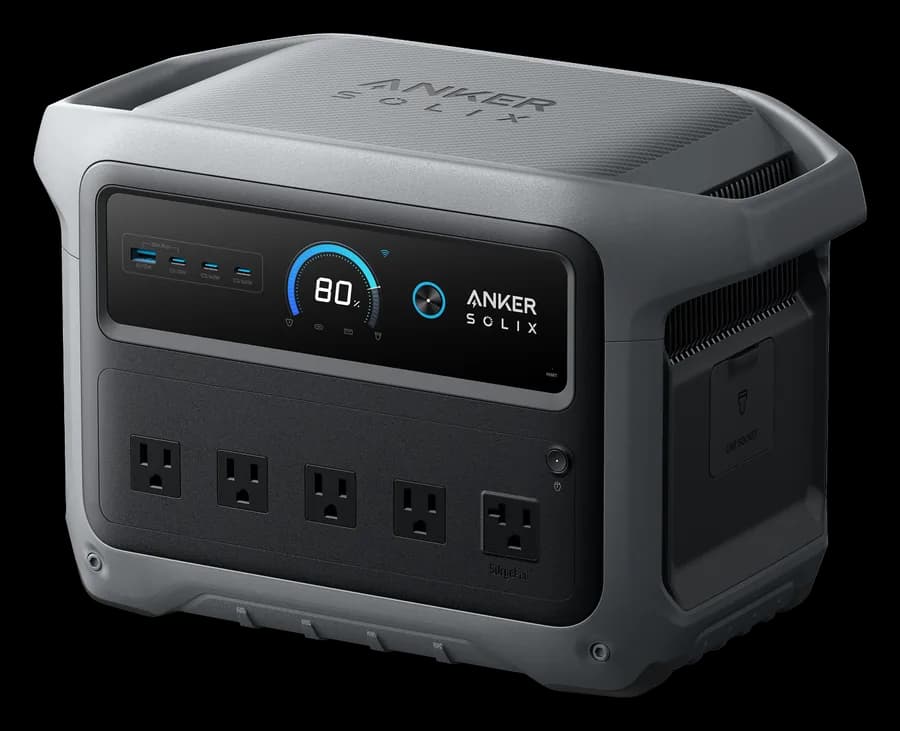
Anker SOLIX C1000 Gen 2
About 28 h of Starlink Mini on DC alone. USB-C up to 140 W and a 12 V car socket.
- Capacity
- 1,024 Wh
- Output
- 2,000 W
- Weight
- 24.9 lb
- UPS
- 10 ms
Paid link
Check price on Amazon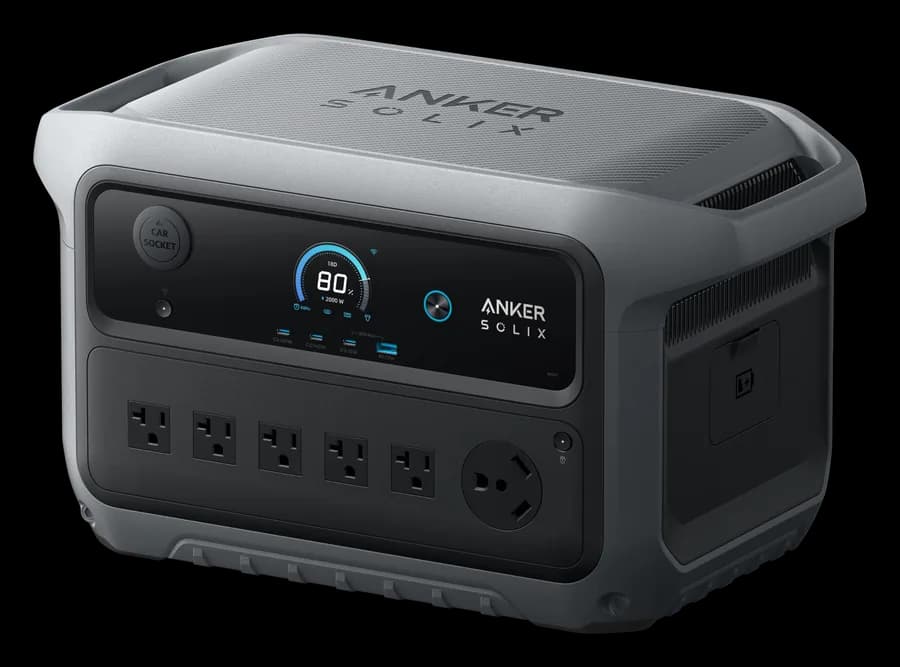
Anker SOLIX C2000 Gen 2
About 15 h of Starlink Standard alone on AC, with 2,400 W of output for a laptop and more.
- Capacity
- 2,048 Wh
- Output
- 2,400 W
- Weight
- 41.7 lb
- UPS
- 10 ms
Paid link
Check price on AmazonBest for Starlink Mini through a workday
Starlink Mini, a laptop and a phone for about 10 hours, light enough to carry in one hand. About 1.0 kWh a day at the devices.
Engine's pick
Anker SOLIX C1000 Gen 2
Black mark: the 10 h you asked for.
- Refills from a wall outlet in about 49 min.
- 25 lb, one-hand carry.
- UPS mode: switches over in 10 ms or less.
- Mini on DC: USB-C up to 140 W, plus a 12 V car socket.
- Not for you if: you plan to add an extra battery; the C1000 Gen 2 cannot be expanded.
Also a fit: Anker SOLIX C800X / C800 Plus (about 11 h) and Jackery Explorer 1000 v2 (about 15 h).
Best for Starlink Mini around the clock
Starlink Mini left on for 24 hours at a campsite or cabin, plus two phones. About 0.8 kWh a day at the devices.
Engine's pick
Anker SOLIX C1000 Gen 2
Black mark: the 24 h you asked for (the low end falls short).
- Refills from a wall outlet in about 49 min.
- 25 lb, one-hand carry.
- UPS mode: switches over in 10 ms or less.
- Mini on DC: USB-C up to 140 W, plus a 12 V car socket.
- Not for you if: you plan to add an extra battery; the C1000 Gen 2 cannot be expanded.
Also a fit: Jackery Explorer 1500 Ultra (about 39 h) and EcoFlow DELTA 3 (about 26 h).
Best for Starlink Mini off-grid with solar
Starlink Mini, a laptop and two phones for a day on battery, then topped up by solar panels and the car. About 1.0 kWh a day at the devices.
Engine's pick
Anker SOLIX S2000
Black mark: the 24 h you asked for.
- Takes up to 400 W of solar.
- 36 lb, two-hand carry.
- UPS mode: switches over in 10 ms or less.
- Mini on DC: USB-C up to 100 W, no 12 V car socket.
- Not for you if: you need over 1500W at once or a 12V car outlet; it has neither.
Also a fit: Anker SOLIX C2000 Gen 2 (about 40 h) and Jackery HomePower 2000 Plus v2 (about 40 h).
Best for Starlink Standard through a workday
Starlink Standard with its router, a laptop and a phone for about 10 hours. About 2.4 kWh a day at the devices.
Engine's pick
Anker SOLIX C2000 Gen 2
Black mark: the 10 h you asked for.
- 2,400 W continuous for your 88 W of devices.
- Refills from a wall outlet in about 58 min.
- 42 lb, two-hand carry.
- UPS mode: switches over in 10 ms or less.
- Not for you if: you need 240V or more than 2400W at once.
Also a fit: Anker SOLIX S2000 (about 12 h) and Jackery Explorer 2000 v2 (about 12 h).
Best for Starlink Standard for a full day
Starlink Standard, a laptop and a phone for 24 hours; wheels are fine. About 2.4 kWh a day at the devices.
Engine's pick
EcoFlow DELTA 3
Black mark: the 24 h you asked for.
- 1,800 W continuous for your 88 W of devices.
- Refills from a wall outlet in about 56 min.
- 28 lb, two-hand carry.
- UPS mode: switches over in 10 ms or less.
- Needs an expansion battery, bought separately, to last as long as you asked.
- Not for you if: you want two solar inputs or 140W USB-C for a large laptop; the DELTA 3 Plus has both.
Also a fit: EcoFlow DELTA 3 Plus (about 35 h with extra batteries) and Anker SOLIX C2000 Gen 2 (about 28 h with extra batteries).
How much longer does Starlink run on DC than on AC?
Typical runtime with the dish alone, from our formula: 90% of the battery usable, 85% inverter efficiency plus standby draw on AC, 90% efficiency on DC. Starlink Mini at 30 W, Standard at 88 W including the router.
| Station | Mini on USB-C or 12 V | Mini on AC | Standard on AC |
|---|---|---|---|
| Anker SOLIX C300 DC288 Wh, DC only | 7.8 h | No AC outlet | No AC outlet |
| Anker SOLIX C300288 Wh | 7.8 h | 5.7 h | 2.3 h |
| Anker SOLIX C1000 Gen 21,024 Wh | 28 h | 19 h | 8 h |
| Anker SOLIX C2000 Gen 22,048 Wh | 2.3 days | 35 h | 15 h |
Why the Mini and the Standard need different stations
Starlink Mini is built to run from DC. It accepts 12 to 48 V on its DC input, up to 60 W, or USB-C Power Delivery from a port that supplies at least 100 W (20 V at 5 A). Starlink lists its average draw at 20 to 40 W. That makes it a small, steady load, and on a small load the inverter's own standby draw is a big share of the total. Plugging the Mini's adapter into an AC outlet works, but in our formula it costs about 42% of runtime.
Starlink Standard comes with an AC power supply and draws 75 to 100 W including the router, about 20 W when idle, and more while melting snow. It has to use the inverter, so output is never the issue (any station with AC outlets covers 100 W), but capacity is. That's why the engine moves Standard setups up to 2 kWh units, while most Mini setups fit a station of about 1 kWh or less.
Two practical checks. First, the Anker SOLIX C300 DC has no AC outlets at all: fine for a Mini, a laptop and phones over USB-C, useless for Standard. Second, some stations switch an outlet off when the load stays small for a while (BLUETTI's ECO mode is on by default, for example). Starlink Mini can fall under that threshold, so turn auto-off or ECO mode off for the outlet you use.
Specs of the picks
| Spec | Anker SOLIX C1000 Gen 2 | Anker SOLIX S2000 | Anker SOLIX C2000 Gen 2 | EcoFlow DELTA 3 |
|---|---|---|---|---|
| Capacity | 1,024 Wh | 2,010 Wh | 2,048 Wh | 1,024 Wh |
| Continuous output | 2,000 W | 1,500 W | 2,400 W | 1,800 W |
| Surge | 3,000 W | 3,000 W | 4,000 W | 3,600 W |
| Boost mode (heating loads) | None | None | None | 2,200 W |
| Battery | LiFePO4, 4,000 cycles to 80% | LiFePO4, 6,000 cycles to 80% | LiFePO4, 3,000 cycles to 80% | LiFePO4, 4,000 cycles to 80% |
| Weight | 24.9 lb | 35.7 lb | 41.7 lb | 27.6 lb |
| AC outlets | 5* | 5* | 4 + TT-30* | 6 |
| USB-C | 3 × up to 140 W | 2 × up to 100 W* | 3 × up to 140 W | 2 × up to 100 W |
| 12 V car outlet | Yes | No | Yes | Yes |
| Wall charge, 0–100% | 49 min | Not published | 58 min | 56 min |
| Solar input | 600 W, 11-60V (XT60i) | 400 W | 800 W, 11-60V, 17A (XT60i) | 500 W, 11-60V |
| UPS switchover | ≤10 ms | ≤10 ms | ≤10 ms | ≤10 ms |
| Extra batteries | Not expandable | Not expandable | Up to 4,096 Wh | Up to 5,000 Wh |
| Warranty | 5 years | 5 years | 5 years | 3 years* |
* Not stated on the maker's spec sheet, or derived from other official figures.
Change one thing, see the pick change
Starlink Mini, a laptop and a phone, then the same setup with a different runtime, carry limit or dish. Each row runs the quiz engine.
Starlink Mini, laptop, phone: 10 hours, one hand
1.0 kWh/day · 10 h
Open this in the quiz and change the devicesEngine's pick
Anker SOLIX C1000 Gen 2
About 15 h · also Anker SOLIX C800X / C800 Plus, Jackery Explorer 1000 v2
Same, but a full 24 hours (two hands)
1.0 kWh/day · 24 h
Open this in the quiz and change the devicesEngine's pick
Anker SOLIX C2000 Gen 2
About 41 h · also Jackery Explorer 1500 Ultra, Anker SOLIX S2000
Same, with solar and car charging
1.0 kWh/day · 24 h
Open this in the quiz and change the devices
Engine's pick
Anker SOLIX S2000
About 40 h · also Anker SOLIX C2000 Gen 2, Jackery HomePower 2000 Plus v2
Swap in Starlink Standard: 10 hours
2.4 kWh/day · 10 h
Open this in the quiz and change the devicesEngine's pick
Anker SOLIX C2000 Gen 2
About 12 h · also Anker SOLIX S2000, Jackery Explorer 2000 v2
Just the Mini and a phone: 10 hours, one hand
0.7 kWh/day · 10 h
Open this in the quiz and change the devicesJackery512 WhEngine's pick
Jackery Explorer 500 v2
About 13 h · also Anker SOLIX C800X / C800 Plus, EcoFlow RIVER 2 Pro
Picks come from the same engine as the quiz, recalculated whenever our catalog changes.
Try your own setup
Add your dish, router and laptop, set the hours, and switch devices to DC where your station has the port for it.
1. What you want to run
Starlink Mini
Runs on 12–48 V DC or a 100 W USB-C PD port. Snow melting can reach its 60 W max input.
Laptop
Charge from the station's USB-C port to skip inverter losses.
2. The power station
What people actually ask
How long will a 1000 Wh power station run a Starlink Mini?
About 28 h when the Mini runs from the station's USB-C or 12 V port at its typical 30 W, and about 19 h through the AC outlet with the Mini's power adapter. Snow melting and hot weather push the Mini toward its 60 W maximum and shorten that.
How long will a power station run Starlink Standard?
Starlink Standard draws 75 to 100 W including its router, and it only runs on AC. At a typical 88 W, a 2,048 Wh station runs it about 15 h and a 1,024 Wh station about 8 h. A full 24 hours takes roughly 3,200 Wh of battery.
Can I power Starlink Mini from USB-C?
Yes, if the port supplies at least 100 W of USB-C Power Delivery (20 V at 5 A), which is Starlink's stated minimum, and you use a cable rated for 100 W. The Mini also accepts 12 to 48 V DC, so a station's 12 V car socket works with a suitable cable. A port below 100 W may not keep it running.
Is it better to run Starlink on DC or AC?
DC, when your dish allows it. Skipping the inverter and its standby draw gave about 42% more runtime for the Mini on a 1 kWh station in our formula. Starlink Standard ships with an AC power supply, so it has to use an AC outlet.
How much solar do I need to run Starlink off-grid?
To put back one day of a Starlink Mini running around the clock, plan on about 290 W of panels with 4 peak sun hours. Starlink Standard needs about 1,050 W of panels for the same, which also means a station that accepts that much solar input.
Who should buy which
- Starlink Mini for a workday or a night: a unit of about 800 Wh to 1 kWh with a 100 W USB-C port, still under 25 lb. A 300 Wh unit runs the dish alone for about 7.8 h, short of a full night.
- Starlink Mini around the clock: a 1 kWh-class unit, run from DC.
- Starlink Standard: a 2 kWh unit for a workday; for 24 hours or more, an expandable unit or solar.
- Home internet backup in outages: a station with a fast UPS switchover keeps the dish and router up without rebooting.
The bottom line
Match the station to the dish. Starlink Mini is a 20 to 40 W DC load, so a 1 kWh unit running it from USB-C or 12 V covers about a day. Starlink Standard needs AC and two to three times the energy, which puts you in 2 kWh territory. For your exact devices, the sizing quiz runs the same engine; the runtime calculator and the comparison chart cover the rest. If Starlink is your outage internet, see the home backup picks too.
Anker SOLIX C1000 Gen 2
A fridge, microwave or coffee maker in an outage, from a 1 kWh unit under 25 lb.
- Capacity
- 1,024 Wh
- Output
- 2,000 W
- Weight
- 24.9 lb
- UPS
- 10 ms
Paid link
Check price on AmazonAnker SOLIX C2000 Gen 2
A fridge, sump pump or RV via the TT-30 outlet, with one extra battery to reach 4 kWh.
- Capacity
- 2,048 Wh
- Output
- 2,400 W
- Weight
- 41.7 lb
- UPS
- 10 ms
Paid link
Check price on AmazonSources (checked 2026-11-01)
- Starlink Mini specification sheet
- Starlink Help Center: powering Starlink Mini
- Starlink Standard specification sheet
- Starlink Standard (V4) specification sheet
- Starlink Help Center: power consumption
- Anker SOLIX C1000 Gen 2 (official)
- Anker SOLIX S2000 (official)
- Anker SOLIX C2000 Gen 2 (official)
- EcoFlow DELTA 3 (official)